
How to use a Password Generator for secure credentials
Learn to generate strong, secure passwords that resist hacking attempts. Understand password entropy, character types, length requirements, and best practices for online security.
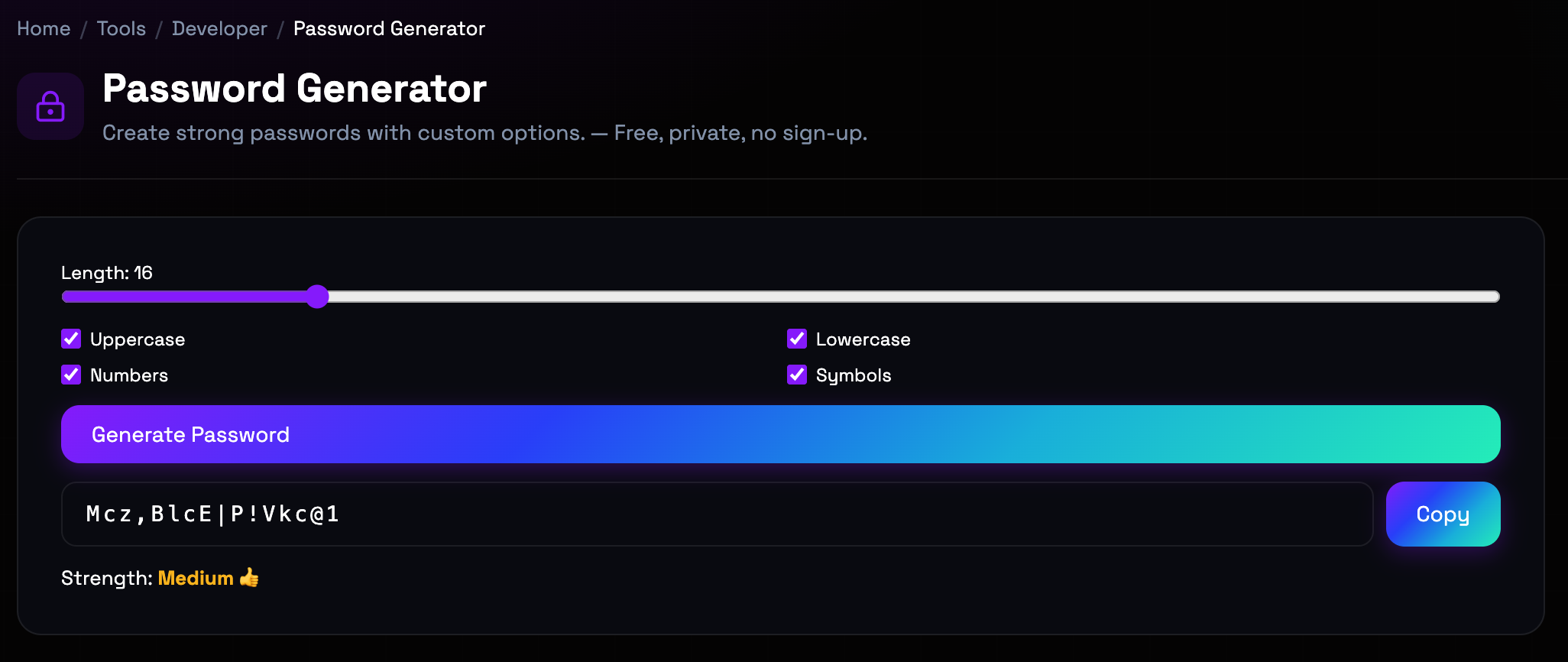
What is the Password Generator?
Password strength depends on entropy—randomness and unpredictability. Simple passwords like 'password123' are vulnerable to dictionary attacks and brute force cracking. Strong passwords combine length, character variety, and randomness to resist automated attacks. Modern password generators use cryptographically secure random number generation to create passwords that cannot be predicted. Understanding password security principles helps you protect accounts from unauthorized access. The balance between security and memorability matters—password managers solve this by storing complex passwords securely while requiring you to remember only one master password.
Step-by-Step: How to Use It
- Set Password Length: Choose a length between 8-64 characters. Longer passwords are exponentially more secure. We recommend 16+ characters for critical accounts. (length slider with number input)
- Select Character Types: Include uppercase letters, lowercase letters, numbers, and symbols. More character types increase password complexity and security. (checkbox toggles for each character type)
- Configure Advanced Options: Optionally exclude similar characters (like O and 0) or ambiguous characters (like l and 1) to improve readability. (advanced options dropdown)
- Generate and Copy: Click generate to create a random password. Copy it immediately and store it securely in a password manager. (generate button with copy to clipboard)
Top Use Cases
- New Account Creation: When creating new accounts, generate unique, strong passwords instead of reusing passwords across sites. This prevents credential stuffing attacks. Example: Signing up for a banking service: generate a 20-character password with all character types, store it in your password manager.
- Password Rotation: Regularly updating passwords for sensitive accounts reduces risk from data breaches. Generate new passwords periodically. Example: Quarterly security review: generate new passwords for email, banking, and social media accounts, updating each in your password manager.
- Temporary Access: For shared accounts or temporary access, generate strong passwords that can be changed later after access is revoked. Example: Sharing a Netflix account temporarily: generate a strong password, share it, then change it after the borrowing period ends.
- API Key Generation: Developers use password generators to create random API keys and secrets that cannot be guessed or predicted. Example: Generating a new API secret for a web service: create a 32-character random string to use as the secret key.
Things to Watch Out For
- Browser-Based Randomness: Browser random number generators may not be cryptographically secure in all contexts, though modern browsers have improved significantly. Workaround: For extremely high-security needs, consider using dedicated hardware security modules or offline password generators. For most use cases, browser-based generation is sufficient.
- Password Reuse Risk: Even strong passwords are vulnerable if reused across sites. Data breaches on one site expose credentials that can be used elsewhere. Workaround: Never reuse passwords. Use a password manager to generate and store unique passwords for every account. Enable two-factor authentication where available.
- Memorability vs Security: Very long, complex passwords are secure but difficult to remember, leading users to write them down or reuse simpler passwords. Workaround: Accept that you cannot memorize all passwords. Use a password manager to store them securely. Memorize only the master password for the manager.
- Character Restrictions: Some systems have arbitrary restrictions on password length or character types, preventing use of optimally secure passwords. Workaround: Generate the strongest password allowed by each system's restrictions. If a site limits length to 12 characters, use all available character types to maximize entropy within constraints.
Frequently Asked Questions
How long should my password be?
Password length is the most important factor in security. We recommend 16+ characters for critical accounts like banking and email. 12 characters is minimum for general accounts. Each additional character exponentially increases security—a 20-character password is trillions of times stronger than a 12-character one. If a system allows 32+ characters, use it. Length matters more than complexity, but combine both for maximum security.
Why include symbols and numbers if length is most important?
While length is primary, character variety adds security by increasing the search space for attackers. Including uppercase, lowercase, numbers, and symbols means attackers must try more combinations. A 16-character password with all character types is stronger than a 16-character password with only lowercase letters. Character variety also helps meet arbitrary password requirements that many sites enforce.
Are randomly generated passwords better than passphrases?
Both approaches can be secure. Random passwords with high entropy are mathematically stronger but harder to remember. Passphrases (random words like 'correct-horse-battery-staple') are easier to remember and can be equally secure if they're long enough (4+ random words). The key is randomness—common phrases or song lyrics are not secure passphrases. Use random passwords with a password manager for maximum security, or passphrases if you need to memorize them.
How do I remember all these complex passwords?
You don't—and shouldn't try. Use a password manager (like Bitwarden, 1Password, or LastPass) to generate, store, and autofill unique passwords for every account. You only need to remember one strong master password for the manager. This is the modern, secure approach to password management. Writing passwords down or reusing them across sites are both dangerous practices.
Is it safe to generate passwords in a web browser?
Yes, provided you're using a reputable site and your connection is secure (HTTPS). Our generator runs entirely in your browser—your passwords are never sent to our servers. The generation happens locally using JavaScript. For maximum security, ensure you're on a secure network and the site uses HTTPS. For extremely sensitive accounts, you could use an offline password manager, but browser-based generation is safe for most use cases.
How often should I change my passwords?
Modern security guidance recommends changing passwords only when there's evidence of compromise or a breach. Frequent mandatory password changes often lead to weaker passwords as users make incremental modifications (password1, password2, password3). Instead, use unique, strong passwords for every account, change them immediately if a service is breached, and enable two-factor authentication. Focus on password uniqueness and strength rather than arbitrary rotation schedules.
Ready to get started?
Access the tool immediately. No sign-up or credit card required.
Open Password Generator